A development team needs to preserve pledges, linked donations and acknowledgement history while choosing a supported future system. With support retirement approaching, the priority is a reconciled migration plan rather than a new implementation of this product.
Who it is for
Nonprofit finance and fundraising operations maintaining an existing Fundraising and Engagement deployment.
Where it fits
A development team needs to preserve pledges, linked donations and acknowledgement history while choosing a supported future system. With support retirement approaching, the priority is a reconciled migration plan rather than a new implementation of this product.
What is included
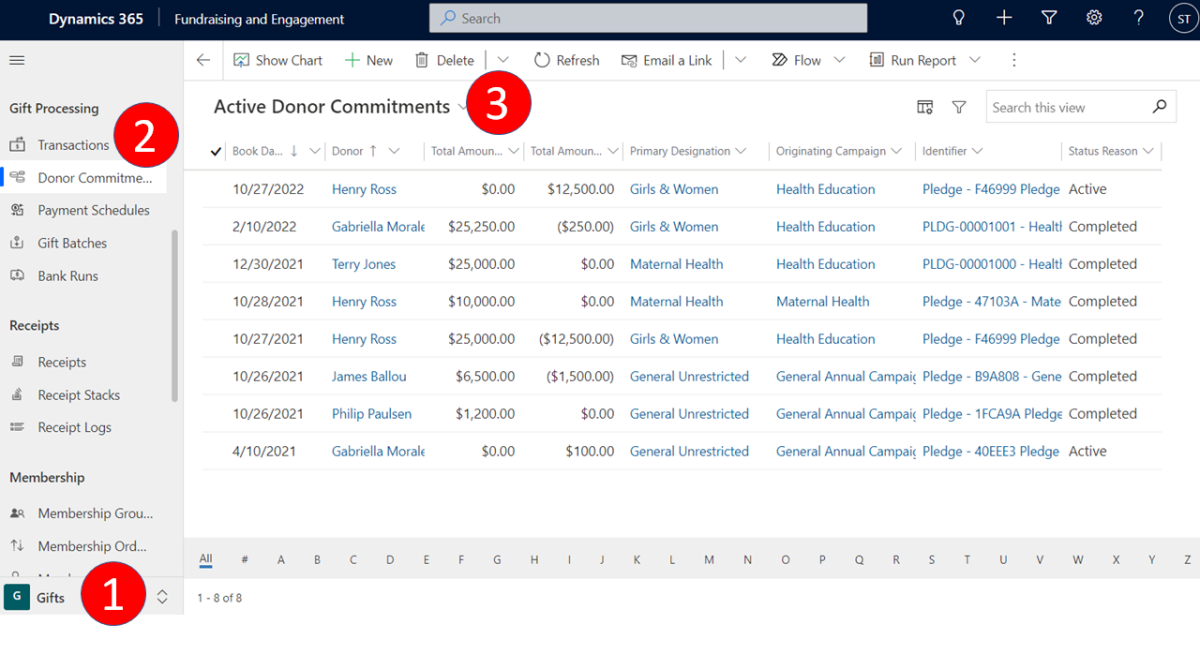
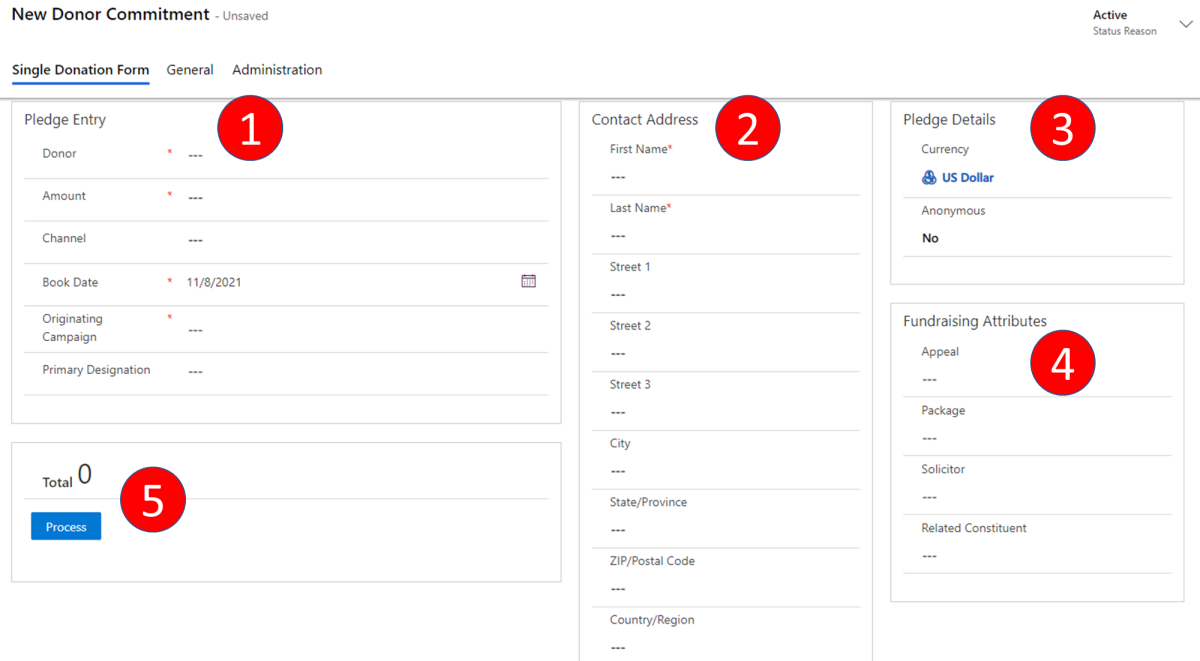
The documented donor-commitment workflow distinguishes a pledge from the transactions that fulfil it. Gift Processing includes donor commitments and transactions; the commitment form includes pledge entry, contact address, pledge details, fundraising attributes and processing. Payment schedules represent promises to make multiple donations on a schedule and are not interchangeable with a single commitment.
Prerequisites to check
Confirm your installed release, payment integrations, primary configuration record and document templates. Inventory custom fields, receipting rules, gift restrictions and reporting obligations with finance. Establish which data must remain auditable after migration and which users may view donor and payment information.
Setup and adoption
Do not propose a new licence for a product whose new licensing has ended. Export a controlled sample of commitments and linked transactions, reconcile outstanding balances and document payment schedules separately. Test the replacement with finance and fundraising users before scheduling a production cutover or retiring integrations.
Read the real workflow before mapping the replacement
The list image shows an overview of donor commitments and their status; it is not a list of all cash received. The form image shows where pledge information, contact details and fundraising attributes are collected. Microsoft’s original numbered callouts are retained without alteration. These historical documentation images explain the legacy workflow, not a promise of a current supported interface.
Test a partially fulfilled pledge, a written-off balance and an acknowledgement generated from an activated template. Confirm that transactions remain attributable to the correct commitment and designation. During migration, reconcile aggregate balances as well as individual records; matching a total alone can hide incorrectly associated donors or restrictions.
Evaluate safely before changing a production environment
Use the scenario above as a test case, not as an instruction to install every similarly named tile. Record the exact solution name, publisher, version, dependencies and target environment before making changes. Fundraising and Engagement can have related packages or sample data; those entries do not necessarily represent separate business applications. A visible tile is not proof of a current licence, supported deployment path or successful configuration.
For a supported, installable Dataverse application, verify Microsoft’s environment requirements first. Dynamics 365 apps require the appropriate licence and a database environment created with Dynamics 365 apps enabled where specified. Check your administrator role, regional availability and capacity. Export customizations, confirm a usable backup and work in a sandbox with synthetic data. Do not import sample data into a live tenant simply to reproduce an illustration.
Define an operational acceptance test
Have a representative nonprofit user walk through the stated example with a least-privileged account. Verify which tables and forms changed, what stayed in the existing application and which integration still needs to be implemented. Agree who owns record matching, exception handling, access reviews and ongoing support. This is particularly important when extending an existing environment with managed solution dependencies.
Record expected outcomes before the pilot: one complete business transaction, correct access for each role, an intentional failure case and a recovery procedure. Document the exact product versions used in the pilot, and revisit the linked sources before approving rollout. This editorial guide is not a licence grant, regulatory certification or a guarantee that a package remains available in every tenant.
Limitations and considerations
Microsoft’s support commitment ends December 31, 2026; a visible installed tile does not extend it. Payment processing depends on configuration and integrations. The separate Fundraising template is not the same application, and its own February 2027 support transition must also be considered.
Alternatives to evaluate
Assess maintained nonprofit platforms or a partner-maintained implementation with explicit support, payment, receipting and migration responsibilities. Compare preservation of financial history and audit trails, not simply whether a replacement has a donor form.
Sources and verification
This guide is an editorial interpretation of the primary documentation below, reviewed November 23, 2026. Product scope and lifecycle may change; rely on Microsoft’s current source for final decisions.